
Plush Button Badge File Setup: Fabric Shift and Safe-Zone Logic
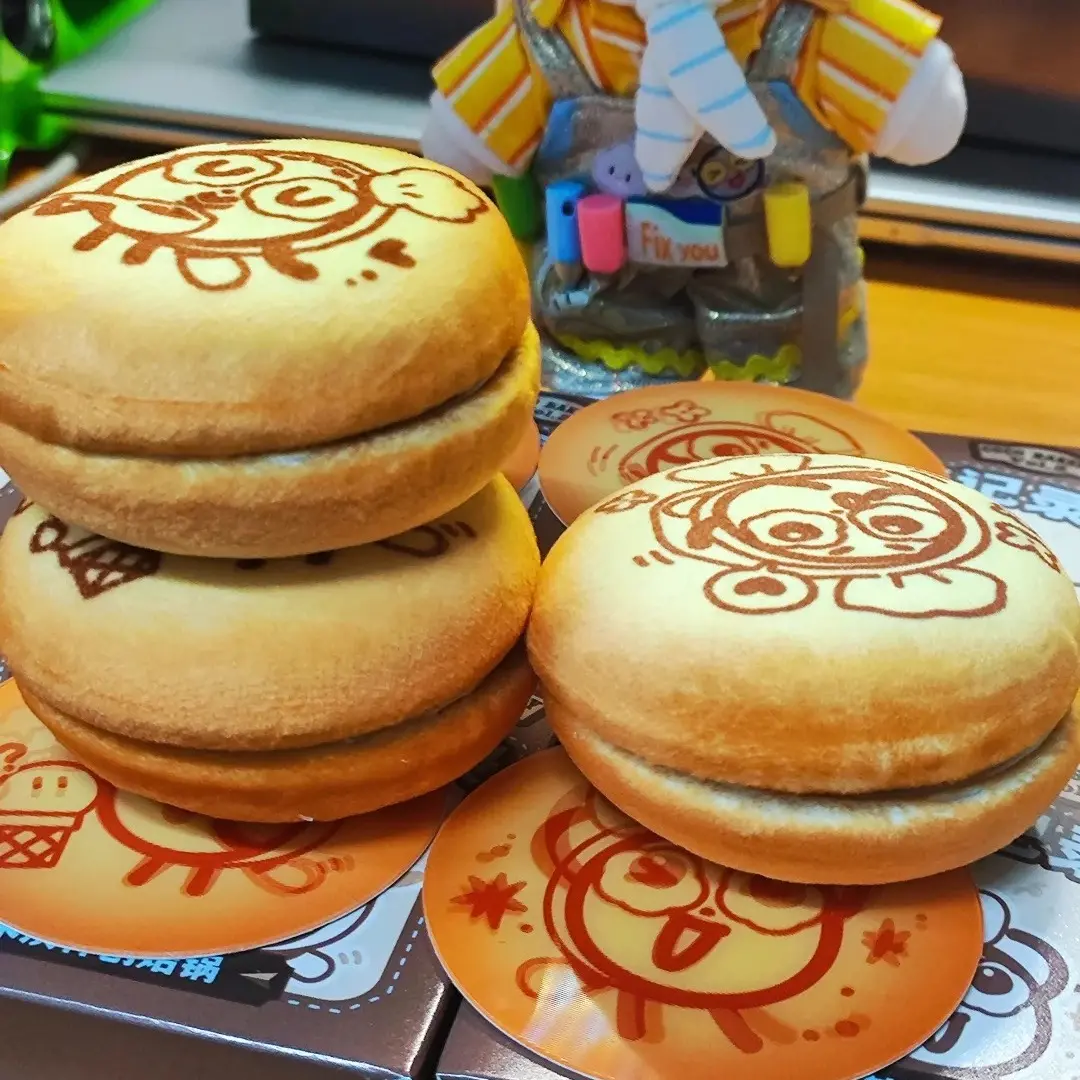
Plush Button Badge File Setup: Fabric Shift and Safe-Zone Logic
Why the 75 mm plush badge needs tighter safe-zone discipline than any tinplate pin.
TL;DR
A plush button badge is a 75 mm round pin with a soft fabric face over a double-layer foam interior — the squish is the product, but the fabric shifts slightly during pressing, which means your safe-zone discipline has to be tighter than it would be on any standard tinplate badge. Submit your art at 1057 × 1057 px square, keep critical content inside the inner safe circle in Popecho's onsite editor, and account for the way plush pile softens fine detail before you commit to a print run.
What This Subtype Actually Demands
The plush button badge is not a standard pin with a texture upgrade. The fabric face is the primary experience — buyers pick it up to squeeze it, not just to read the design. That tactile priority shapes every production decision downstream: the double-layer foam stack (crystal water-cushion sponge plus breathable mesh sponge) gives the badge its signature QQ bounce, but it also makes the unit thicker and heavier than a flat tinplate badge. More importantly for file prep, the plush fabric shifts slightly during pressing and assembly. That shift is small, but at 75 mm diameter there is not much margin to absorb it. Anything important placed near the circular edge — a face, a logo, a character name — can drift outside the visible area on the finished unit. The entire file strategy flows from that single physical fact.
(The sun-valley matte backing is standard for this subtype and signals directly to the Japanese-style fan merch collector scene, where back-finish consistency across a badge set is noticed.)
Setting Up the Artwork
The upload canvas is 1057 × 1057 px square. Popecho applies the circular crop at production — you do not draw the circle yourself, but you do need to work within it precisely. Open the product in Popecho's onsite editor and the safe-zone overlay appears immediately: an outer boundary representing the bleed edge and an inner circle marking where critical content must stay. That inner ring is the constraint that matters. Keep faces, text, logos, and any element a buyer will look for well inside it — at least one full safe-zone ring inward from the cut line.
Bleed is 3 mm, already built into the 1057 px canvas. Extend background colour and non-critical fill art to the outer boundary so no white gap appears after the circular cut. The accepted formats are PNG, JPG, and PSD. Design in your normal RGB workflow; Popecho's production handles colour output for the plush-fabric print process.
One practical check before upload: view your art at thumbnail scale. If the design reads clearly at small size on screen, it will survive the plush pile. If it only resolves at full zoom, the fabric texture will finish it off.
Surface and Production Decisions
Plush fabric is printed by sublimation, and the pile diffuses fine detail in a predictable way. Gradients and photographic-style images — the kind of soft-shaded character art common in the Japanese merch scene — render well and can look warmer and more dimensional than the same art would on tinplate. Thin strokes, hairline text, and fine linework lose crispness. Bold, high-contrast art is what this surface rewards.
Expect colour to read slightly softer and more muted than your monitor preview. The fabric texture adds warmth; this is a production characteristic of the material, not a calibration error. If colour accuracy matters for your run — matching a specific character palette, for instance — start with a small batch (MOQ is 4 pcs) before committing to a larger order. Popecho's production lead time is 7 days, which makes a proof run practical even on a short project schedule.
The foam interior increases overall badge thickness and weight (estimated around 13 g versus roughly 8 g for a standard tinplate unit). Standard flat badge boards and pin-display stands may not grip this variant securely — worth checking your display setup before a merch table run.
What Trips Creators Up
Treating it like a flat badge file. The standard tinplate badge workflow assumes the design holds at the cut edge. On a plush badge, the fabric shifts. Files built without safe-zone discipline regularly produce off-centre prints with cropped faces or clipped text.
Non-square canvas submissions. The production template is 1057 × 1057 px square. Submitting a pre-cropped circle or a differently sized file breaks the circular crop alignment. Popecho's editor loads the correct canvas dimensions — start there rather than building the artboard from scratch.
Fine text near the edge. Small type and hairline detail fail twice on this subtype: the plush pile softens them and the fabric shift can carry them outside the safe zone. Move key text to the centre third of the design.
Skipping the proof run. Colour on plush reads differently than on screen or on tinplate. A 4-piece proof order before a volume print is the lowest-cost way to confirm the palette lands the way you intend.