
Slide Acrylic Keychain: Two Art Files, One Charm
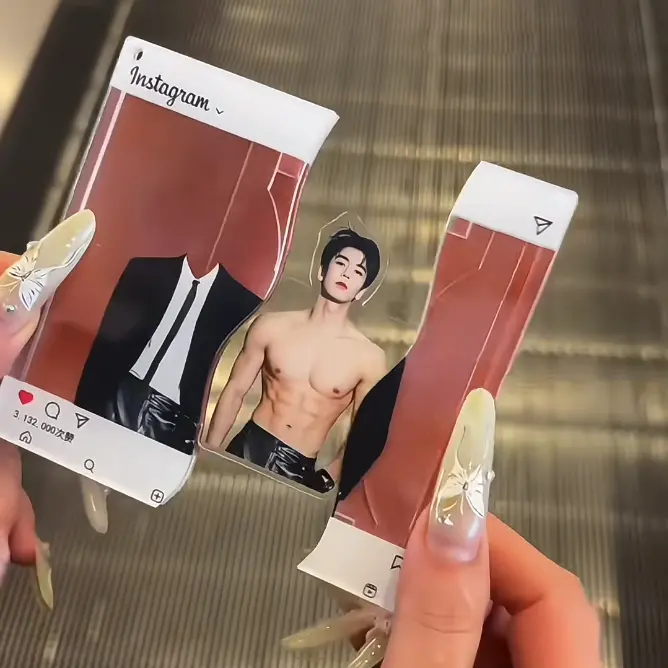
Slide Acrylic Keychain: Two Art Files, One Charm
The sandwich construction needs separate artwork for the sticker layer and the inner standee figure.
TL;DR
A slide acrylic keychain is a three-component sandwich: two clear acrylic cover plates, a printed sticker insert visible through the front plate, and a die-cut acrylic figure that slides into a routed channel between them. The production decision that trips most creators is realising they need two distinct art files with two different die-cut boundaries — one for the sticker layer, one for the inner standee. Open your chosen shape variant in Popecho's editor first; the dashed cut lines for both components load automatically.
What This Subtype Actually Demands
Most acrylic keychains are single-layer: one acrylic piece, one printed surface. The slide acrylic keychain is structurally different — it is a three-component sandwich with a mechanical function. Two clear acrylic cover plates enclose a printed sticker insert and a separate die-cut acrylic standee figure that slots into a routed channel inside the body. The channel is what makes the "slide" mechanic work: the inner figure can be removed and reinserted without disturbing the outer shell.
That mechanical reality has a direct art consequence. The sticker layer and the inner standee figure are two separate printable components with different die-cut silhouettes and different edge-safety requirements. Treating them as one file is the foundational mistake this article is here to prevent.
Setting Up the Artwork
Before touching a canvas, open your chosen shape variant in Popecho's onsite editor. The editor loads the dashed cut-line template for that variant automatically — egg/Tamagotchi, burger, cake, or retro record each has its own silhouette and its own internal channel geometry, so working from the wrong canvas wastes production time.
For the sticker insert layer, the editor shows the printable boundary as a dashed line with a 2 mm bleed extension beyond the cut edge. Extend your background artwork to that bleed boundary; keep all critical detail — faces, text, character linework — inside the safe-zone overlay. The red boundary visible inside the editor marks where the acrylic frame and channel structure will physically overlap your artwork; anything outside it will be hidden.
For the inner standee figure, the die-cut silhouette is narrower and shaped to the channel width. Art that extends to the very edge of the figure piece risks sliding behind the channel walls and disappearing in the finished charm. Pull key detail at least 2–3 mm inward from the standee's cut edge.
Resolution minimum is 300 DPI. Submit in RGB color mode as PNG, JPG, or PSD. The editor enforces the correct canvas dimensions per shape, so you do not need to calculate them independently.
Surface and Production Decisions
The front acrylic plate is fully transparent — it acts as a lens over the sticker layer rather than a printed surface. Two consequences follow.
First, the sticker is the only color-bearing layer visible through the front. Clean linework and saturated fills reproduce best. Fine gradients near the cut edge are likely to be obscured by the acrylic frame overlap, so push important tonal transitions toward the center of the composition.
Second, do not rely on a plain white background fill unless you want that white to read as an intentional design choice through the clear plate. If your character art has transparency, decide deliberately whether the charm should show the sticker background or appear as a floating figure.
The inner standee figure is also a printed acrylic piece. Its artwork must account for the fact that the top edge of the figure sits inside the channel slot — that portion is structurally necessary but visually hidden. The "slide" design advantage is real: the inner figure can be swapped or updated without reprinting the outer shell, which makes this format useful for seasonal character variants sharing one base shape.
Popecho produces this keychain in 8 days with an MOQ of 1 unit, so a single proof run before a larger order is always practical.
What Trips Creators Up
Submitting one art file instead of two. The sticker layer and the inner standee figure have different die-cut outlines and different safe-zone requirements. Both components need their own prepared file. Popecho's editor loads each component's cut line separately when you select the variant.
Ignoring the channel-edge dead zone on the standee. The top portion of the inner figure is hidden inside the routed channel. Art or text placed at the very top edge of the standee silhouette disappears into the slot. Keep the readable part of the character below the channel insertion point.
Skipping protective film removal during assembly. Both acrylic cover plates carry double-sided protective film — four film faces total. Skipping even one layer before applying the sticker causes permanent haze visible through the finished charm. Assembly Step 1 exists for a reason.
Slotting the inner figure backwards. The standee must be inserted with its printed face pointing outward toward the front plate. Reversing this is irreversible without full disassembly. Check orientation before pressing the second plate into place.