
Acrylic Photocard File Setup: The Mirror Composite Decision
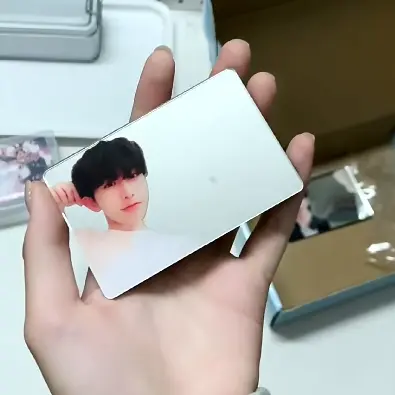
Acrylic Photocard File Setup: The Mirror Composite Decision
Whether the mirror back layer shows through depends entirely on one file-prep choice.
TL;DR
Popecho's acrylic photocard is a 58×88mm laser-cut card built from a 1+1 acrylic laminate with a mirror back layer. The single production decision that changes everything is whether you upload a transparent-background PNG or an opaque file: a cutout PNG activates the mirror composite effect; a solid background suppresses it completely. Open the product in Popecho's editor, confirm your 60×90mm canvas with 1mm bleed on each side, and decide which effect you're going for before you export.
What This Subtype Actually Demands
The mirror acrylic photocard is not simply a thicker version of a paper photocard. Its defining feature is the mirror back layer bonded under the printed front panel — and that layer is either the whole point of the piece or completely invisible, depending on what file you upload. When the front print carries a transparent background, the subject appears to float against a reflective surface, creating the composite portrait effect where the card seems to merge the subject with whoever is holding it. When the front print is opaque, the mirror layer is blocked entirely and you have a clean flat card. That choice cannot be corrected after production begins, so it has to be made at the file-prep stage, not at checkout. Everything else — the 2mm laminate thickness, the laser-cut rounded corners, the standard 58×88mm footprint — follows from that single upstream decision.
Setting Up the Artwork
The finished laser-cut size is 58×88mm, leaving exactly 1mm of bleed on each of the four edges. Extend any background art to the full 60×90mm canvas; keep all critical detail and text inside the 58×88mm boundary.
Open the product in Popecho's onsite editor and the safe-zone boundary and cut line load as live guides — you can see exactly where the laser will trim before you confirm anything.
Once your cutout is loaded, use the rotation control inside the editor to set the composite orientation. The editor preview shows both standard and composite layout before you lock the order — check it before you proceed. Keep your file under 2MB; oversized files reduce print sharpness at output.
Surface and Production Decisions
The 1+1 acrylic laminate sandwich produces a card that feels meaningfully heavier and more rigid than a paper photocard — closer in hand feel to a small premium tag than a standard collectible card. The mirror back layer is not customisable; it is a fixed material component of this variant.
Color mode matters here in a practical way. Acrylic print is processed in RGB, and CMYK files will shift in saturation and hue during conversion. If you have a CMYK source file, convert it to RGB and re-proof your colors before submitting — particularly for skin tones and pastel ranges, where the shift is most visible. The product guide flags that super-saturated tones and very pale values (under roughly 20% in any channel) reproduce with noticeable deviation on the finished acrylic surface; test-proof those ranges if your artwork sits at either extreme.
Laser cutting produces smooth rounded corners and a clean card outline. Fresh-cut acrylic can carry a faint burnt smell and minor residue at the cut edge from the laser pass. Peeling the protective film and rinsing with water or hand soap removes it before use — worth noting in any care card you include with a creator set.
MOQ is 5 pcs, which makes a single-design sample run before a larger print realistic at low cost.
What Trips Creators Up
Uploading a solid-background file when they intended the mirror effect. The composite portrait effect requires background removal as a mandatory step, not an option. A white-background JPG or PNG will produce a clean opaque card — there is no way to recover the mirror effect after the file is processed.
Skipping the composite-orientation step in the editor. The editor has a rotation control specifically for setting the correct composite layout. Missing this step means the subject may be oriented incorrectly relative to the mirror reflection in the finished card.
Working in CMYK and not converting before upload. RGB is required. CMYK submissions will shift — sometimes subtly, sometimes significantly — at processing. Convert and re-proof, especially if skin tones or brand colors are critical.
File size creep from high-res exports. The 2MB per-image limit is firm. Large exports from high-resolution compositing software can cross it without the creator noticing. Check file size before uploading, and compress without dropping below 300 DPI.