
Desk Calendar File Setup: Spiral Margin and Pearl Stock
Desk Calendar File Setup: Spiral Margin and Pearl Stock
Why the top 10–15 mm and the ice-white base change every layout decision you make.
TL;DR
Popecho's 8-inch custom desk calendar prints your artwork on pearlescent ice-white coated paper, spiral-bound into a self-standing 2026 dated format. The two decisions that shape every other choice are: keeping artwork clear of the top spiral-punch zone, and treating the pearl stock as a warm-shimmer base rather than pure white. Open the product in Popecho's editor, confirm your artboard and bleed boundaries, then build your CMYK 300-DPI file around those two constraints before uploading.
What This Subtype Actually Demands
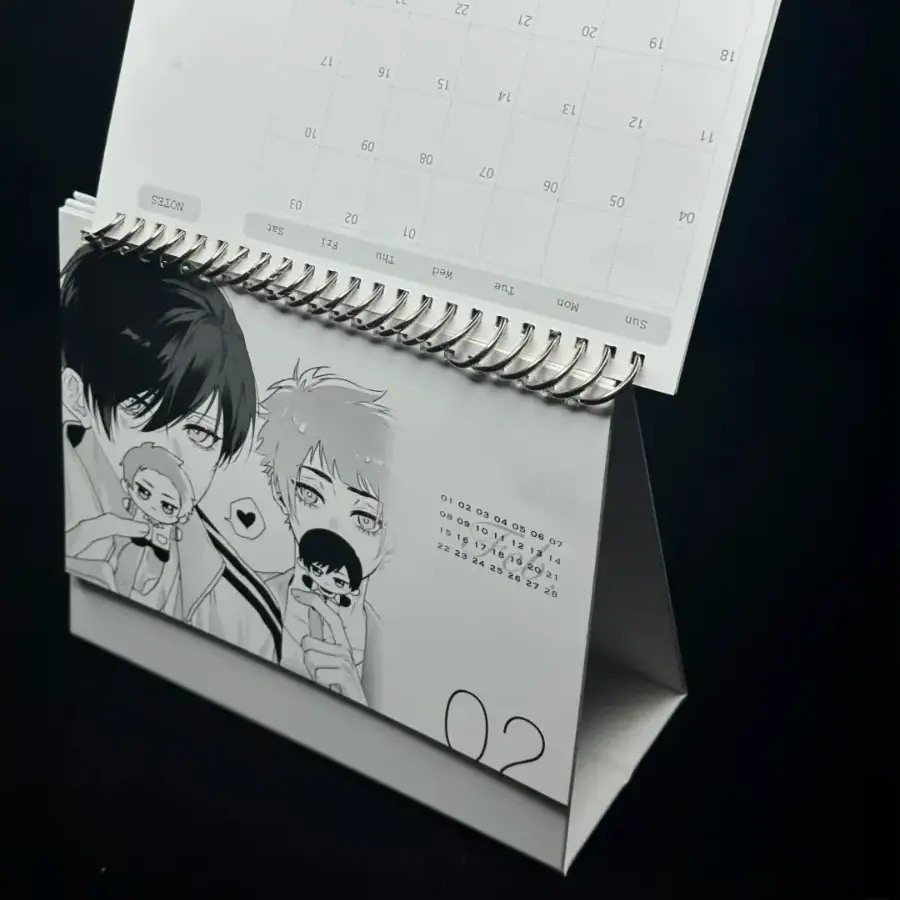
A spiral desk calendar is a structurally constrained product in a way that a flat print is not. The spiral wire is not decoration — it is the stand mechanism, and it physically punches through the top 10–15 mm of every leaf. That zone is gone before a single copy is printed. Any character face, logo lockup, or headline text that drifts into that band will be obscured or perforated in the finished piece.
The second constraint is the dated layer. Popecho's production template carries the 2026 date grid; your artwork lives around it, not on top of it. You are designing an illustrated calendar, not a blank print. And because 2026 is a fixed calendar year, this is not an evergreen SKU — plan your run conservatively so you are not holding unsellable stock in January 2027.
Setting Up the Artwork
Each leaf runs approximately 203 × 140 mm finished. Bleed is 3 mm on all sides, so your working canvas should extend to roughly 209 × 146 mm before you place any artwork. Open the product in Popecho's editor and the artboard for this SKU loads with the bleed boundary already marked as a live guide — use that as your outer limit, not a manual measurement.
Safe zone is 3–5 mm inside the trim line on the left, right, and bottom edges. The top edge needs more: keep all meaningful artwork at least 15 mm below the physical top of the leaf to stay clear of the spiral-punch zone. Popecho's editor marks this exclusion band, so the constraint is visible rather than something you have to calculate separately.
File delivery is CMYK at 300 DPI. Accepted formats are PNG, JPG, or PDF. Submit one file per leaf design; there is no back-face artwork slot on this SKU — single-sided print only.
One pearlescent-specific note: the ice-white stock is not neutral white. Build your colour fills and highlights with that shimmer base in mind. Anywhere your design calls for a true white area — a bright highlight, a clean border, a light-fill background — add a printed fill rather than relying on the paper surface itself. (On-screen mockups will not show the pearl shift; a physical sample run before a large drop is worth it.)
Surface and Production Decisions
The 珠光冰白纸 (pearlescent ice-white coated paper) is the defining material choice here. The pearl coating creates directional light-scatter: the calendar looks different under angled light than it does under flat overhead light. That is the premium visual effect you are paying for, and it photographs well when lit from the side. For product photography, plan for angled lighting; flat studio light will flatten the shimmer.
Colour rendering on pearl coated stock reads slightly cooler and more luminous than on standard matte coated paper. Dark solids stay rich. Gradients can pick up subtle surface texture from the pearl coating at certain angles. If your artwork has large areas of mid-tone gradient, run a physical proof before committing to a full batch — screen colour proof alone will not capture the interaction.
The coated surface is not pen-friendly. If this calendar is meant to double as an autograph or event piece where someone will sign across the printed face, the standard finish is not suitable for that use case without a matte laminate layer.
Popecho produces in 7 days. MOQ is 1 unit, which lets you run a single-copy sample before scaling. Batch pricing improves across quantity steps, and runs of 500 or more route through Popecho's dedicated batch-custom channel rather than standard storefront checkout.
What Trips Creators Up
Artwork placed in the spiral zone. The top 10–15 mm gets punched for the binding wire. Layouts built to fill the full leaf top-to-bottom will lose their header elements. Keep the top margin clear and move key artwork downward.
Treating the paper as pure white. Ice-white pearl stock has a cool shimmer cast. White text or white highlight areas that rely on the paper base will look off-white and slightly tinted in the final print. Add a printed white or light-fill layer under any element that must read as clean white.
Ignoring the 2026 date layer. The date grid is pre-set. You cannot move, resize, or remove it. Artwork that fills the date area will conflict with the printed dates. Design your illustration to frame or complement the date zone, not compete with it.
Over-ordering a year-dated SKU. This calendar is only sellable through 2026. Stock left at year-end has no resale shelf life. Start with a conservative run — the 1-unit MOQ exists precisely so you can proof before scaling.